

How to Adjust Navigation Volume in Apple CarPlay and Android Auto
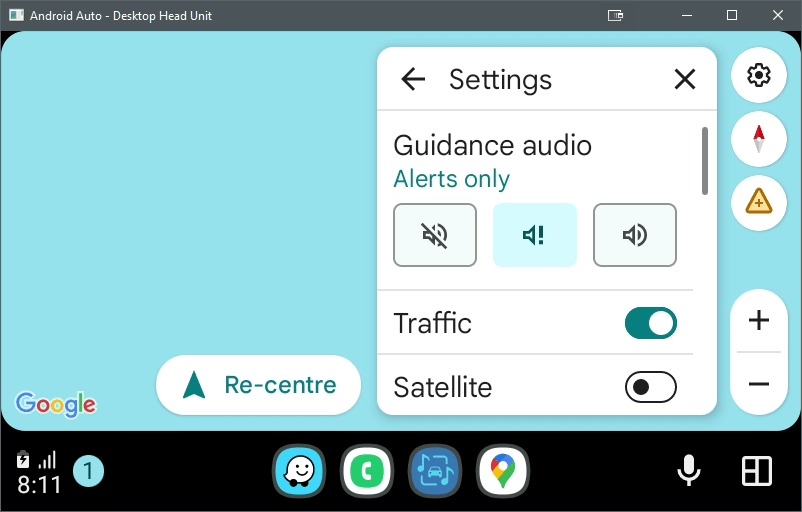
Adjusting navigation volume in Apple CarPlay and Android Auto requires changing the setting specifically while the system is speaking, a process that often confuses first-time users. According to automotive forum discussions and user manuals, standard volume controls on steering wheels or head units default to media playback, meaning users must trigger a navigation prompt to isolate and adjust the voice guidance levels separately.
Why Navigation Volume Often Seems Stuck
Modern infotainment systems use a feature called “audio ducking,” which lowers the volume of music or podcasts when a navigation instruction is active. As noted by various automotive troubleshooting forums, if a user adjusts the physical volume knob while the system is not actively speaking, the car only registers a change for the primary media source. This creates a common trap: if a driver accidentally lowers the volume during a quiet moment in a navigation sequence, they may inadvertently mute the voice guidance entirely while leaving the music at an audible level.

The Evolution of In-Car Audio Connectivity
The transition from legacy hardware to integrated smartphone mirroring systems like CarPlay and Android Auto has significantly altered how drivers manage cabin audio. Older systems, often reliant on Bluetooth adapters or FM transmitters, treated all audio as a single stream. In contrast, Google and Apple have designed interfaces that treat navigation, telephony, and media as distinct audio layers.
According to data from Statista, the global market for connected car services continues to expand, with smartphone integration being a primary driver for new vehicle purchases. While these systems offer higher fidelity than traditional FM transmitters, the complexity of managing multiple audio layers remains a significant friction point for new users transitioning from older, simpler setups.
Future Trends in Infotainment
Industry analysts expect future infotainment updates to prioritize “context-aware” audio settings. Instead of requiring manual adjustments during active speech, next-generation systems are expected to use AI-driven volume balancing that automatically detects ambient cabin noise levels. This would theoretically eliminate the need for users to manually “catch” the voice prompt to adjust its volume.
Frequently Asked Questions
Why can’t I find a volume slider for navigation in my phone settings?
Most smartphone apps, such as Waze or Google Maps, sync their audio output directly to the vehicle’s head unit. Once connected to CarPlay or Android Auto, the car’s internal software takes priority over the phone’s internal app settings.
Does the volume fix work for phone calls too?
Yes. Similar to navigation, phone call volume is managed as a separate audio channel. If your call volume is too low, adjust it while you are actively on a call, not while listening to music.
Will updating my phone software fix audio issues?
Software updates for iOS and Android often include patches for connectivity, but they rarely change the fundamental way volume channels are managed. If you experience persistent audio drops, check your head unit’s firmware updates rather than just your phone’s.
Have you struggled with hidden settings in your car’s infotainment system? Share your experiences in the comments below or subscribe to our newsletter for more hands-on tech troubleshooting guides.