
How to Monitor Your SSD Health and Extend Its Lifespan
The Silent Killer: Why Your SSD Isn’t as Immortal as You Think
When the tech world pivoted from clunky, spinning mechanical hard drives to sleek Solid State Drives (SSDs), we were promised a revolution. No moving parts meant no mechanical failure. We were told these drives were practically indestructible compared to their predecessors. But there’s a catch that rarely makes it onto the glossy marketing packaging: SSDs have a finite lifespan.
Unlike a mechanical drive that might give you a clicking warning before it dies, a failing SSD often goes quietly into the night, sometimes locking you into a read-only state without a moment’s notice. If you rely on your PC for work or precious memories, it’s time to stop treating your storage like a “set it and forget it” component.
The Hidden Math: How NAND Flash Actually Dies
Every time you save a file, move a folder, or update Windows, your SSD is performing a “programme/Erase” (P/E) cycle. Because flash memory can’t overwrite data directly—it has to erase a block before writing new information—the cells physically degrade over time.
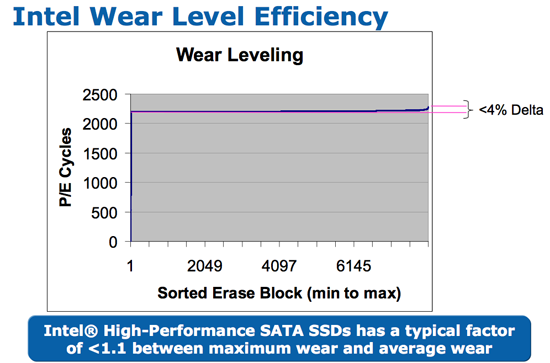
Think of it like a piece of paper you’re constantly erasing and rewriting on. Eventually, the paper tears. SSD manufacturers use “wear leveling” to spread this stress across the drive, and “over-provisioning” to keep spare blocks in reserve. However, once those spare blocks are exhausted and the P/E cycle limit is hit, the drive triggers a safety mechanism: it becomes read-only to protect your data. You can read your files, but you can’t save a single thing more.
Beyond the “Health Percentage” Myth
If you check your Windows settings, you might see a “95% Healthy” status. Don’t let that number lull you into a false sense of security. That percentage is often a broad estimate based on total bytes written. It doesn’t account for:
- Reallocated Sector Count: A sign that the drive is already failing and moving data to “spare” cells.
- Critical Warnings: Any non-zero value here is a red flag that requires immediate backup action.
- Thermal Stress: Excessive heat can accelerate degradation far faster than normal write operations.
Future Trends: Is Your Data Safe in the Long Run?
As we move toward higher-density storage like QLC (Quad-Level Cell) NAND, the trade-off is often lower endurance. While these drives are cheaper and store more data, they have fewer P/E cycles than their predecessors. We are heading into an era where “Storage Lifecycle Management” will become a standard part of PC maintenance, much like changing the oil in your car.

Expect future operating systems to integrate more aggressive predictive analytics. We are likely to see AI-driven drivers that monitor usage patterns and proactively warn users, “Your current workload will likely exhaust this drive in 6 months; consider moving non-essential data to an HDD.”
Best Practices to Extend Your Drive’s Life
- Stop the “Scratch Disk” Abuse: If you do video editing, don’t use your system SSD as a temporary scratch disk. Use a secondary, cheaper drive for high-frequency temporary files.
- Watch Your Free Space: Never let your SSD get completely full. Leaving 15-20% of your drive empty allows the controller to perform background tasks (garbage collection) more efficiently, reducing wear.
- Power Protection: A sudden power surge during a write operation is the fastest way to brick a controller. Always use a high-quality surge protector or an Uninterruptible Power Supply (UPS).
Frequently Asked Questions (FAQ)
How often should I check my SSD health?
For the average user, checking your S.M.A.R.T. Data with a tool like CrystalDiskInfo every three to six months is plenty.
What is TBW (Terabytes Written)?
TBW is a manufacturer’s rating of how much data can be written to a drive before This proves likely to fail. A 1TB drive usually has a rating around 600 TBW.
Can I recover data if my SSD goes into read-only mode?
Yes. Because the controller locks the drive into read-only mode specifically to prevent further corruption, your data is usually safe. Copy it to a new drive immediately.
Does formatting an SSD hurt it?
Formatting performs a “TRIM” command, which is a healthy operation for an SSD. Occasional formatting is fine, but don’t do it unnecessarily.
Are you currently monitoring your SSD health, or have you been caught off guard by a drive failure before? Share your experience in the comments below, or subscribe to our newsletter for more deep dives into hardware longevity.