
How to Test Verizon, AT&T, and T-Mobile for Free: 2026 Guide
Major U.S. carriers Verizon, AT&T, and T-Mobile now offer 30-day free trials via eSIM technology, allowing users to test networks without switching phone numbers or providing credit cards. T-Mobile provides unlimited data, while Verizon and AT&T offer 100GB limits, according to current carrier trial terms.
How do eSIM-based free trials change the way consumers switch carriers?
The adoption of eSIM technology removes the primary friction point of switching networks: the physical SIM card. Previously, testing a new carrier required a physical swap and often a temporary loss of service. Now, users can activate a secondary provider in an open eSIM slot while keeping their primary number and data plan active.
According to current trial guidelines, this dual-SIM capability allows users to toggle data settings to test a new network’s speed and reliability in real-time. If the trial fails to meet expectations, the user simply deletes the trial eSIM. This shift transforms carrier switching from a high-risk commitment into a low-stakes experiment.
Which carrier trial provides the most competitive terms?
T-Mobile currently leads in raw data offerings, providing unlimited 5G data and a 250GB hotspot bucket. In contrast, Verizon and AT&T cap their trial data at 100GB. T-Mobile also includes specialized services like emergency T-Satellite messaging and 5GB of high-speed data in Canada and Mexico.
Verizon focuses its value proposition on network quality, offering 5G Ultra Wideband access and 4K video streaming for compatible unlocked devices. AT&T mirrors Verizon’s 100GB limit but restricts its trial access exclusively to iPhones, ranging from the iPhone XR to the iPhone 17 series.
| Feature | Verizon | T-Mobile | AT&T |
|---|---|---|---|
| Data Limit | 100GB | Unlimited | 100GB |
| Hotspot | Shared 100GB | 250GB | 25GB |
| Device Support | iOS & Android | iOS & Android | iPhone Only |
| Credit Card Req. | No | No | No |
What happens next for the physical SIM card?
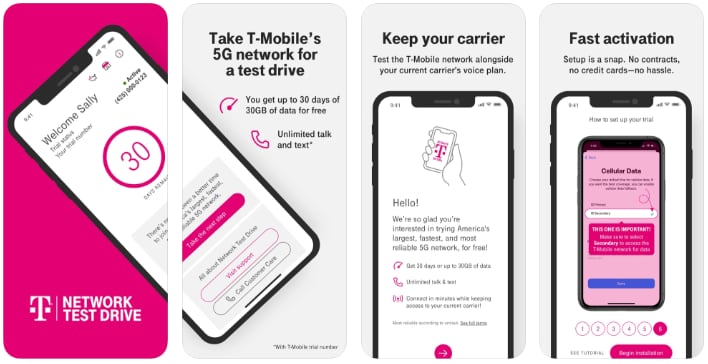
The move toward app-based onboarding suggests a future where physical SIM cards are obsolete. All three major carriers now utilize dedicated apps—My Verizon, T-Life, and the AT&T app—to verify device compatibility and deploy eSIMs in minutes.
This trend points toward “instant-on” connectivity. Instead of waiting for a piece of plastic to arrive in the mail, users can switch providers during a commute or while traveling in an area with poor coverage. This reduces carrier “lock-in” and forces providers to compete on actual network performance rather than the inconvenience of switching.
Why does device compatibility still limit network testing?
Despite the flexibility of eSIMs, hardware restrictions remain. AT&T’s decision to limit trials to iPhones illustrates a lingering fragmentation in how carriers deploy digital services. While Verizon and T-Mobile support both Google Pixel and Samsung Galaxy devices, AT&T’s restricted window suggests different backend integration for Android eSIMs.
This disparity creates a competitive advantage for T-Mobile and Verizon in acquiring Android users. For consumers, it means the “best” network is often determined not just by signal strength, but by whether their specific device is supported by the carrier’s trial infrastructure.
FAQ: Testing Your Mobile Network
Do I have to pay if I don’t cancel the trial?
No. According to the trial terms for Verizon, T-Mobile, and AT&T, no credit card is required for sign-up, and there is $0 cost once the 30-day period ends.
Will I lose my current phone number during the test?
No. These trials use a secondary eSIM slot. Your primary number and data plan remain active on your original carrier throughout the process.
Which app do I need to start a trial?
Use the My Verizon app for Verizon, the T-Life app for T-Mobile, and the AT&T app for AT&T.
Can I use these trials on a locked phone?
No. All three carriers require an unlocked, eSIM-compatible smartphone to activate a free trial.
Which network performs best in your area? Share your trial results in the comments below or subscribe to our newsletter for more connectivity guides.