
iOS 27 Liquid Glass Interface Gets Major Readability Improvements
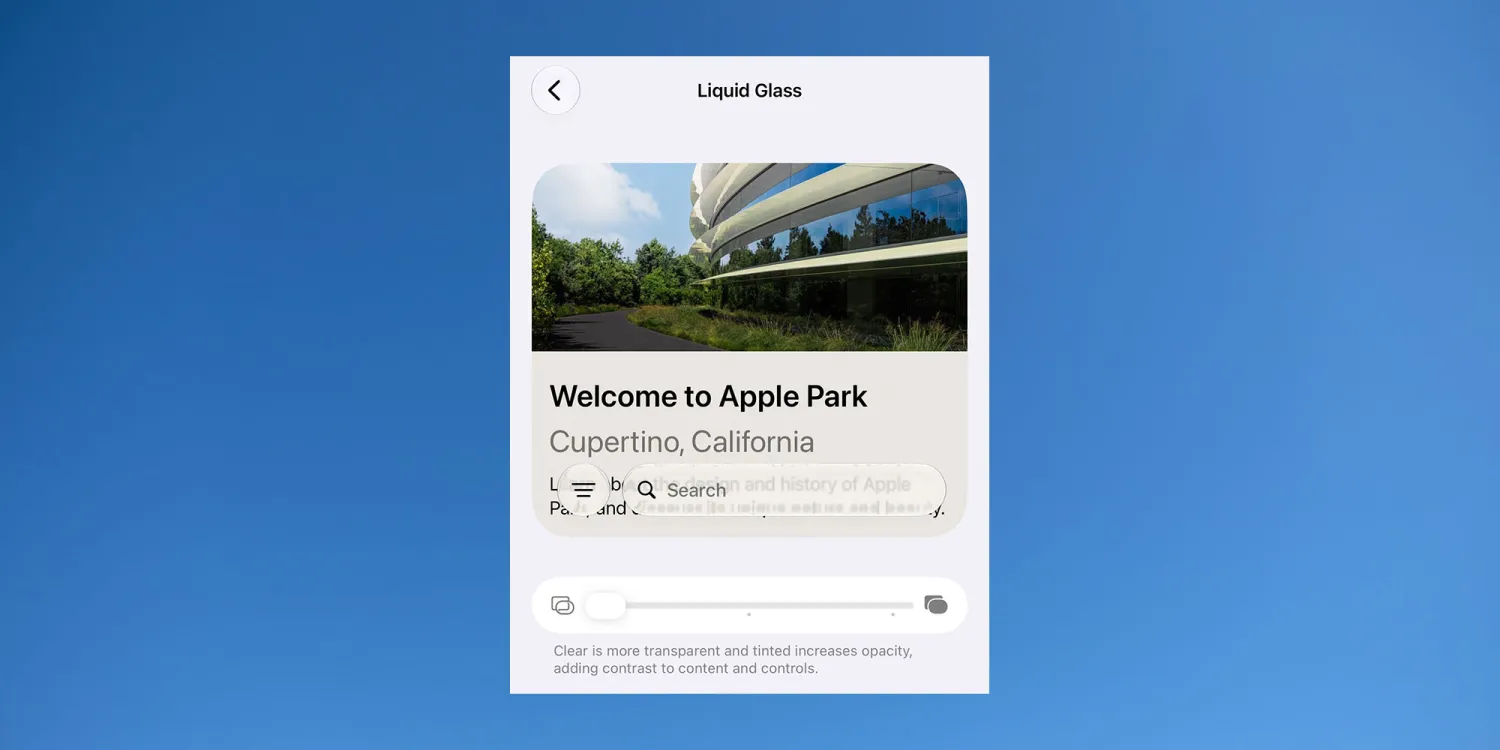
Apple’s iOS 27 resolves readability issues with its “Liquid Glass” interface by implementing a transparency slider and new intelligent blur technology, according to 9to5Mac. These updates allow users to customize opacity and ensure text remains legible against complex backgrounds, addressing criticisms from the design’s initial debut.
How does iOS 27 fix Liquid Glass readability?
Apple introduced a new blurring technology to ensure foreground text remains visible regardless of the background. According to a June 12, 2026, report from 9to5Mac, the system now intelligently obscures background content. This prevents the “uninterpretable” interfaces seen in earlier versions, particularly when dark text overlapped dark background elements.
Beta testers report that these readability problems have practically vanished. Users testing current builds claim the interface remains functional and clear even when the Liquid Glass effect is set to its maximum transparency.
What are the new customization options for iPhone users?
The most significant change to the user experience is the replacement of a simple on/off toggle with a granular transparency slider. 9to5Mac reports that users can now precisely control the degree of translucency.
This allows for a spectrum of visual styles:
- High Transparency: A strong “glass” effect for a futuristic look.
- Mid-Range: A balanced blur that maintains depth without sacrificing clarity.
- Near-Opaque: A traditional solid look for maximum accessibility.
Comparing Liquid Glass Iterations
The evolution of the Liquid Glass interface shows a shift from a rigid design to a user-centric one. Based on reporting from 9to5Mac, here is how the two versions compare:
| Feature | Original Liquid Glass | iOS 27 Version |
|---|---|---|
| Control Method | Binary (On/Off) | Adjustable Slider |
| Legibility | Poor with overlapping layers | High (via intelligent blur) |
| User Feedback | Highly divided/critical | Positive beta reports |
Why did Apple stick with the Liquid Glass concept?
Despite the initial backlash, Apple’s commitment to the Liquid Glass aesthetic suggests it’s the cornerstone of the iPhone’s future visual identity. By solving the usability hurdles, Apple is moving toward a UI that emphasizes depth and transparency without compromising the accessibility standards the company typically champions.
This move mirrors previous design pivots where Apple initially pushed a bold aesthetic—such as the flat design of iOS 7—and refined it over several iterations based on user data and feedback.
Frequently Asked Questions
Will Liquid Glass be available on older iPhones?
While 9to5Mac focuses on the iOS 27 features, compatibility usually depends on the hardware’s GPU capabilities to handle real-time blurring effects.
Can I turn off Liquid Glass entirely?
Yes. The new slider allows users to move toward a nearly opaque appearance, effectively removing the glass effect if preferred.
Does the new blur technology drain more battery?
The provided reports do not mention battery impact, but intelligent blurring is typically more efficient than full-screen transparency renders.
For more updates on the latest software builds, check out our iOS updates hub or follow the latest leaks from 9to5Mac.
What do you think of the Liquid Glass look? Is transparency a feature or a distraction? Let us know in the comments below!